
Half of all knowledge work happens outside the office
Why does my Zoom keep freezing? Teams audio cut out? connection keep dropping? WiFi keep disconnecting? VPN slow everything down? video call keep buffering? network say "unstable"?
Network Weather finds the culprit, then tells you exactly how to fix it. Built for remote, hybrid, and road-warrior employees who need their network to just work. No IT degree required.
See exactly where the problem is
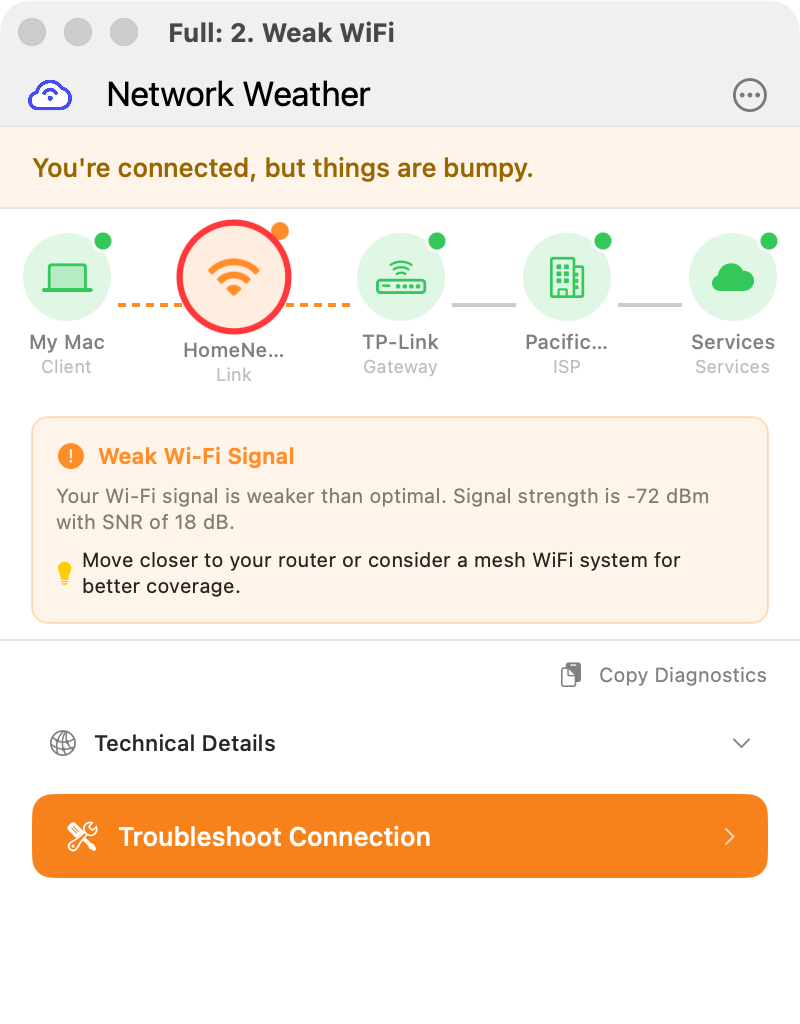
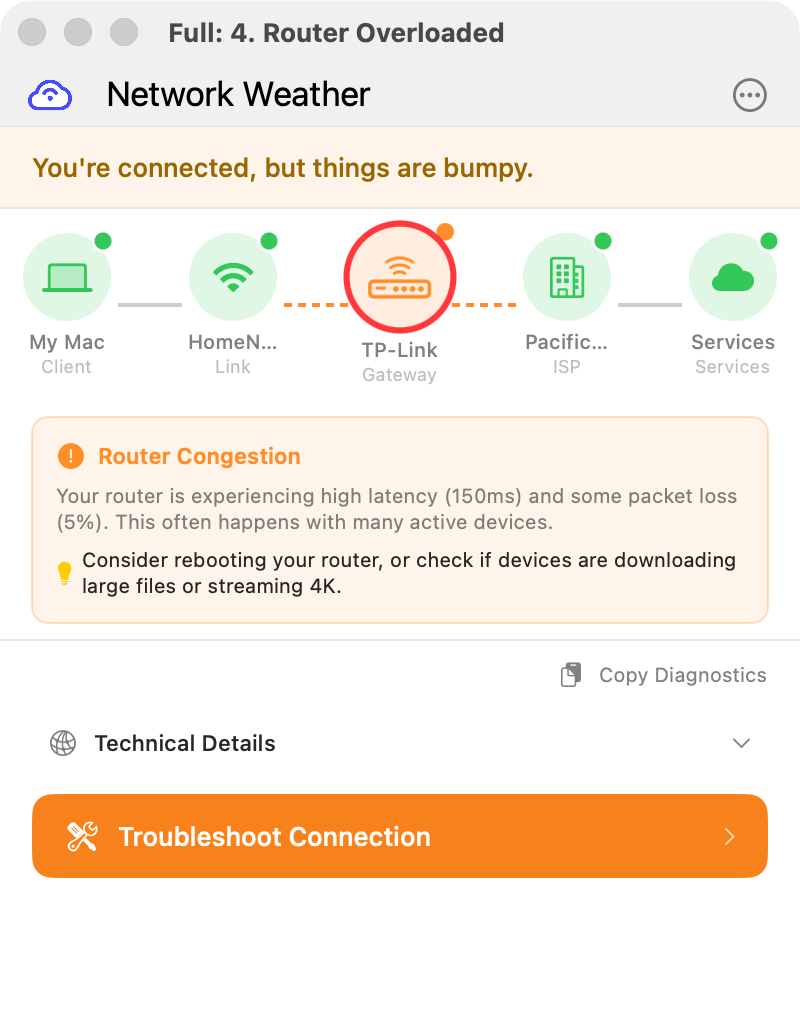
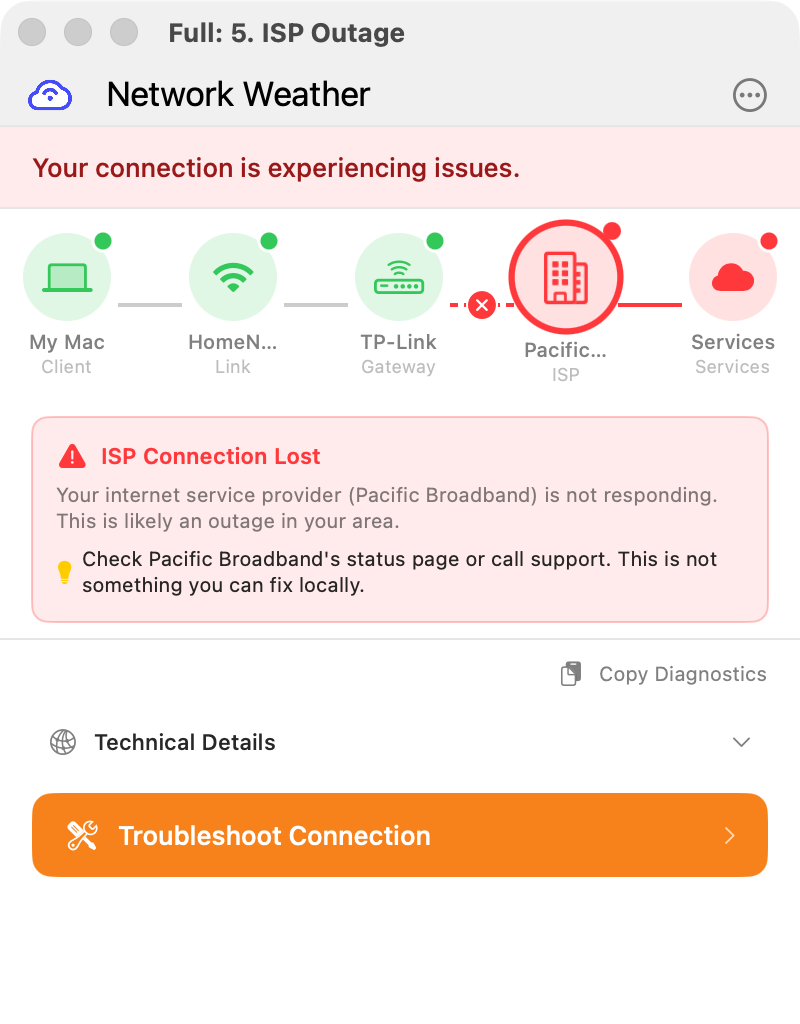
Network Weather maps your entire connection and highlights the culprit
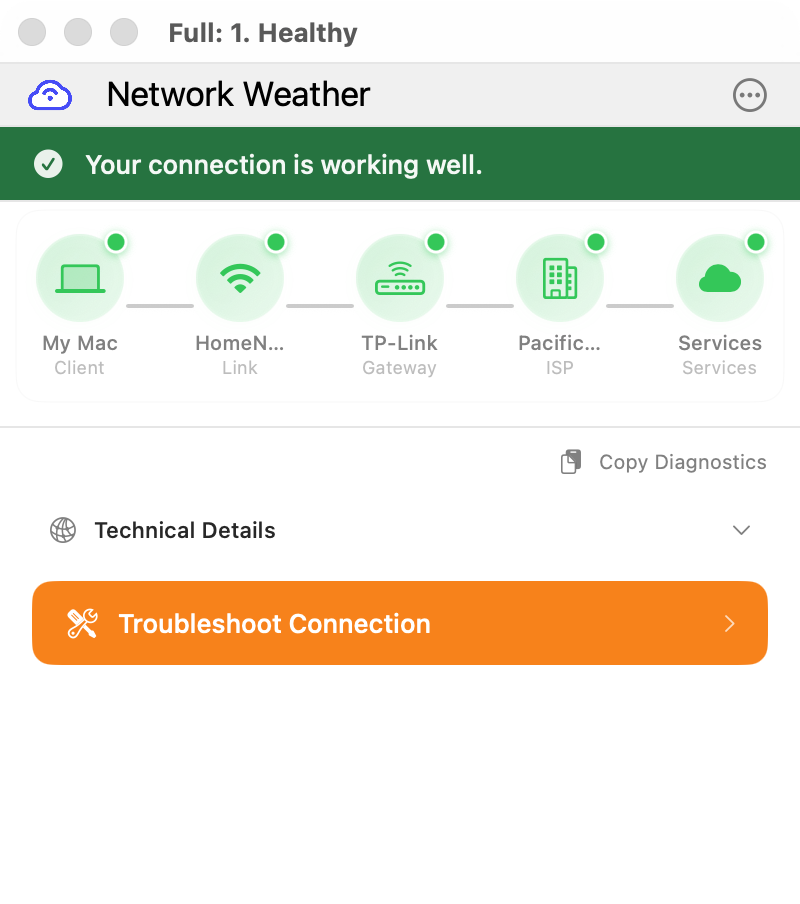
All Clear
When everything's working, all nodes show green. Your connection path is healthy from Mac to cloud services.
WiFi Issue Detected
Weak signal? Interference? The WiFi node lights up red with specific advice: "Move closer to your router or switch to 5GHz."
Router Problem
When your router is overloaded or misconfigured, Network Weather pinpoints it and suggests fixes you can actually do.
ISP Outage
Not your fault! When your ISP is down, Network Weather tells you so, and suggests checking their status page instead of rebooting everything.
Instant diagnosis
Click one button. Get answers in seconds, not hours of troubleshooting.
Plain English first
O en español, si prefieres. The headline tells you what's wrong in words you understand. Technical details are there when you need them.
Actionable fixes
Step-by-step instructions you can actually follow. Fix it yourself, right now.
We've all been there
You're in an important call. The audio starts breaking up. Someone's face freezes mid-sentence. "Can you hear me now?" becomes the meeting's theme.
You restart your router. You move closer to the WiFi. You blame Zoom. But the problem keeps coming back because you never found the actual cause.
Network Weather finds it for you. In plain English.
First, find who's to blame
You can't fix what you can't find. Network Weather pinpoints the culprit in seconds.
Your Computer
Overloaded CPU, bad network settings, or software conflicts
Your WiFi
Weak signal, interference, or wrong frequency band
Your Router/LAN
Firmware issues, congestion, or misconfiguration
Your ISP
Outages, throttling, or peering issues
Your VPN
Slow servers, protocol issues, or split-tunnel problems
The Service
Zoom/Teams/Meet is having their own problems
Once we identify the segment, we give you specific next steps. When the problem is your router, we connect directly to diagnose and often fix it. When it's your ISP, we give you the right words to help their support team resolve it faster. Rebooting your laptop won't fix a peering problem.
We don't just see your router. We talk to it.
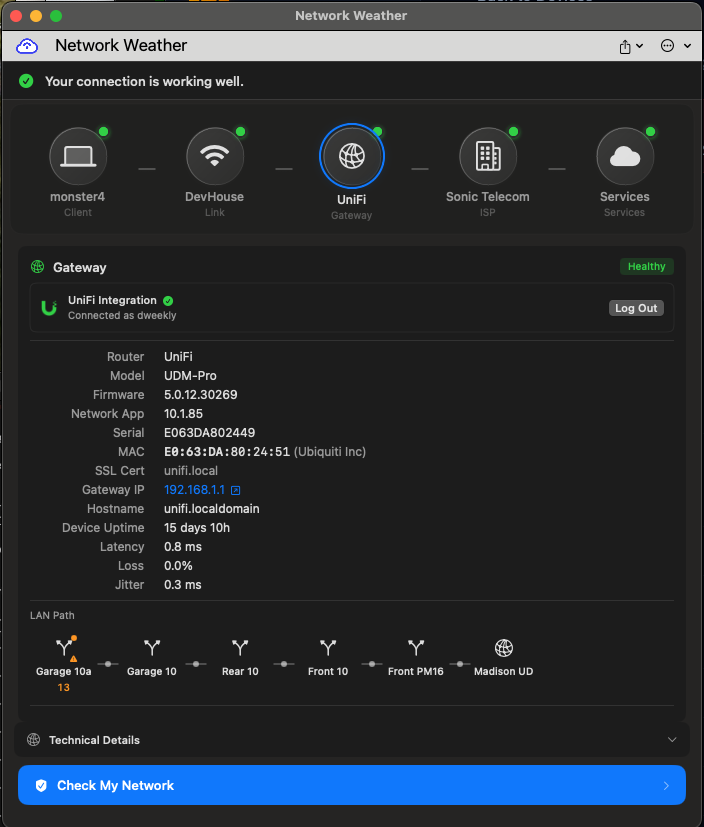
Most tools ping your gateway and call it a day. Network Weather connects to your router's API to read configuration and spot problems other tools miss.
Routers & Access Points
We connect to your router's API and pull data other tools don't even look for.
- Firmware version and update status
- Mesh network topology and uplink quality
- WiFi channel congestion and interference
- Connected device inventory
- Configuration health checks
VPN & Secure Access
We detect when your secure connection is the bottleneck and help you optimize or switch servers.
- Connection health and tunnel latency
- Server selection guidance
- Split-tunnel configuration checks
- Protocol performance comparison
Beyond diagnosis
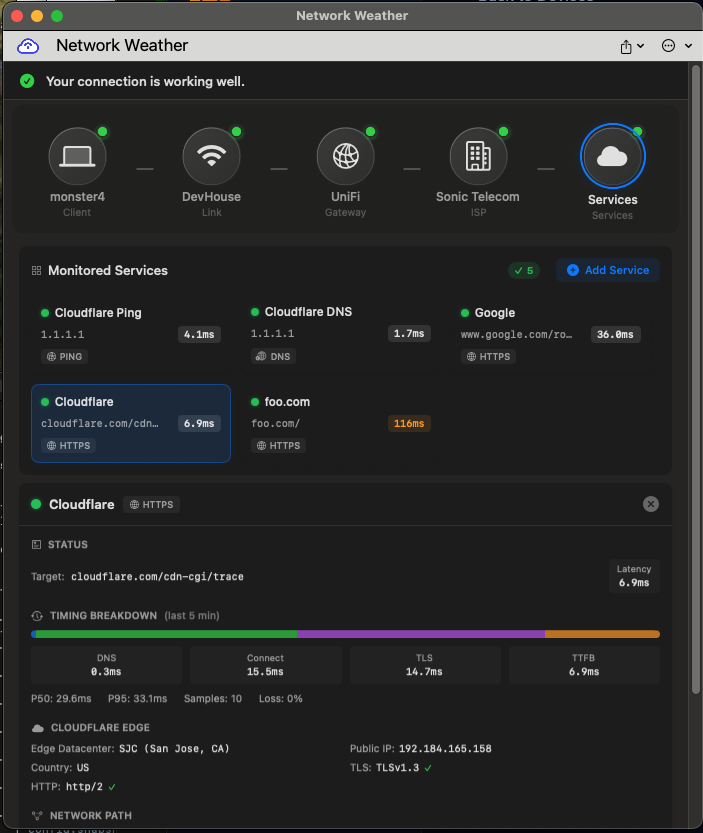
Network Weather works in the background to keep your connection healthy.
Smart WiFi roaming
Moves your Mac to a stronger access point when the one you're on starts dropping. No more clinging to a weak signal from two rooms away.
Guided resolution
When it's your ISP, we write the script so you can skip level-one support. When it's your router, we connect directly.
Always watching
Runs in the background. You don't have to remember to open it before a call.
What's causing your call quality issues?
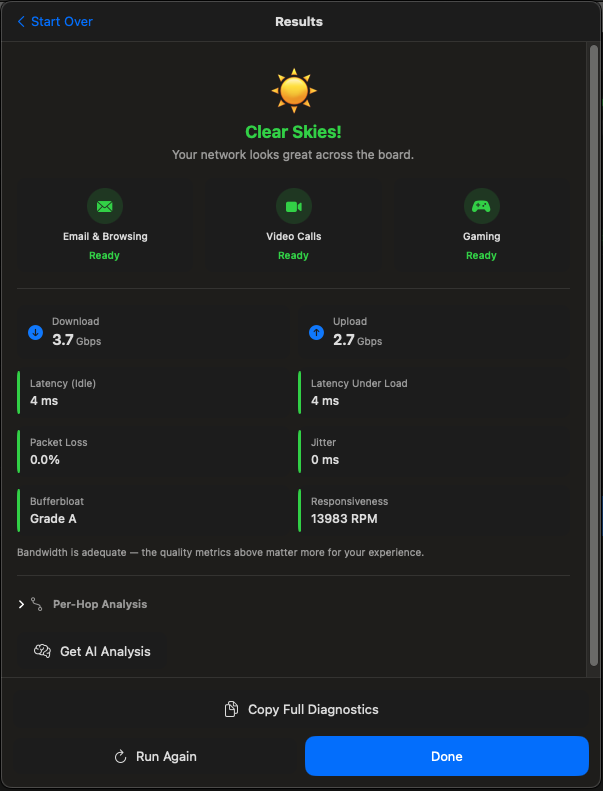
Network Weather detects dozens of problems. Here are the most common culprits.
ISP Outages
Your internet provider is having issues. There's nothing wrong with your setup. It's them, not you.
WiFi Issues
Interference from neighbors, or you're stuck on a weak access point when a stronger one is right there.
Bandwidth Hogs
Someone's streaming 4K or downloading a game update while you're trying to present.
Optimal Settings
Your network is fine, but your Zoom settings could be better.
Four ways to use Network Weather
From a single laptop to thousands of remote employees.
Personal
Fix your own video call issues at home or on the go.
- macOS and Windows apps
- Real-time diagnostics
- Plain English guidance
- Deep router integrations
Managed Service
Reduce client tickets and resolve the rest faster. White-label ready.
- Everything in Personal
- Web dashboard + REST API
- Multi-tenant deployment
- Fleet health monitoring
- Ticketing integrations
Self-Hosted
Deploy on your infrastructure. All data stays in your jurisdiction.
- Everything in Managed
- Self-hosted server
- Fleet-wide health dashboard
- RMM-compatible config deployment
- Health probes to VPN-only internal endpoints
- REST API + config docs
SDK & White-Label
Embed network diagnostics directly into your game or app.
- Games & real-time apps
- Video/audio platforms
- Latency-sensitive software
- SDK integration
- Your branding, our engine
Private by design
We measure network quality, not network traffic.
No root access
Nothing runs with elevated privileges. Standard user permissions only.
Out of the packet path
We never observe your browsing, downloads, or message content. Network metrics only.
Credentials stay local
Router passwords are encrypted with your device biometrics and stored in the OS keychain. They never leave your machine.
Self-host everything
Enterprise customers run the server on their own infrastructure. All data stays in your jurisdiction.
Get early access
Be the first to try Network Weather when we launch.
No spam. Unsubscribe anytime.
Common questions
Will this actually fix my video calls?
Network Weather diagnoses the root cause of call quality issues and gives you specific steps to fix them. If your WiFi signal is weak, we'll tell you. If your ISP is having problems, we'll let you know it's not your fault. Most issues have simple fixes once you know what's wrong.
Do I need to be technical to use this?
Not at all. Network Weather translates technical network data into plain English. You'll see things like "Move closer to your router" instead of "Signal strength: -72 dBm."
Does it work with Zoom, Teams, and Meet?
Yes. Network Weather monitors your network connection, which affects all video conferencing apps. Whether you use Zoom, Microsoft Teams, Google Meet, Webex, or any other platform, we'll help you get better call quality.
How is this different from a speed test?
Speed tests only measure raw bandwidth at one moment. Network Weather continuously monitors your connection, detects issues that cause video problems (like packet loss, jitter, and latency spikes), and tells you how to fix them.
What do the router integrations do?
When you connect Network Weather to your router, we can read its firmware version, check for updates, see mesh network topology and uplink quality, analyze WiFi channel congestion, and detect configuration issues. We have deep integrations with UniFi, TP-Link, ASUS, Netgear, and Linksys, and we can discover and pull basic diagnostics from any UPnP-enabled device on your network.
Is this for home users or businesses?
Both. Individuals use Network Weather to fix their own call quality issues. IT teams and MSPs deploy it to employees to reduce support tickets: users solve problems themselves instead of calling IT. Home networking tickets are notoriously hard to resolve remotely, so self-service pays for itself fast.
Can my IT team manage this remotely?
Yes. Our REST API and web dashboard let IT teams and MSPs monitor fleet health, push configuration updates via standard RMM tools, and integrate with existing ticketing workflows. Enterprise customers can self-host the server for full data control. See our documentation for details.
Can it see what I'm doing online?
No. Network Weather monitors network performance metrics only. We never see your browsing history, email, or any content. Nothing runs as root. Router passwords are encrypted with your device biometrics and stored in the OS keychain, never transmitted. We measure network quality, not network traffic.